FACTFeed formulation software

Features

Everything a feed formulator needs

FACT does the whole job: from your ingredient database and prices to the least-cost formula, the reasons behind its cost and the plan for your raw materials.

Formulation

The least-cost formula, in a click

Open a formula model, check its limits and select Formulate. FACT’s solver returns the cheapest mix that meets every ingredient limit, nutrient limit and ratio, usually in a fraction of a second. A minimum typed above its maximum is caught at once, with the ways to correct it.

Limits in redA limit the formula reaches is marked, so you see what decides the cost.
Costing on screenMaterial cost, overheads, market rate and saving for each bag.
Previous formulaThe cost of a bag before and now, and each ingredient up or down.
Auto FormulateChange a limit, and FACT formulates by itself.
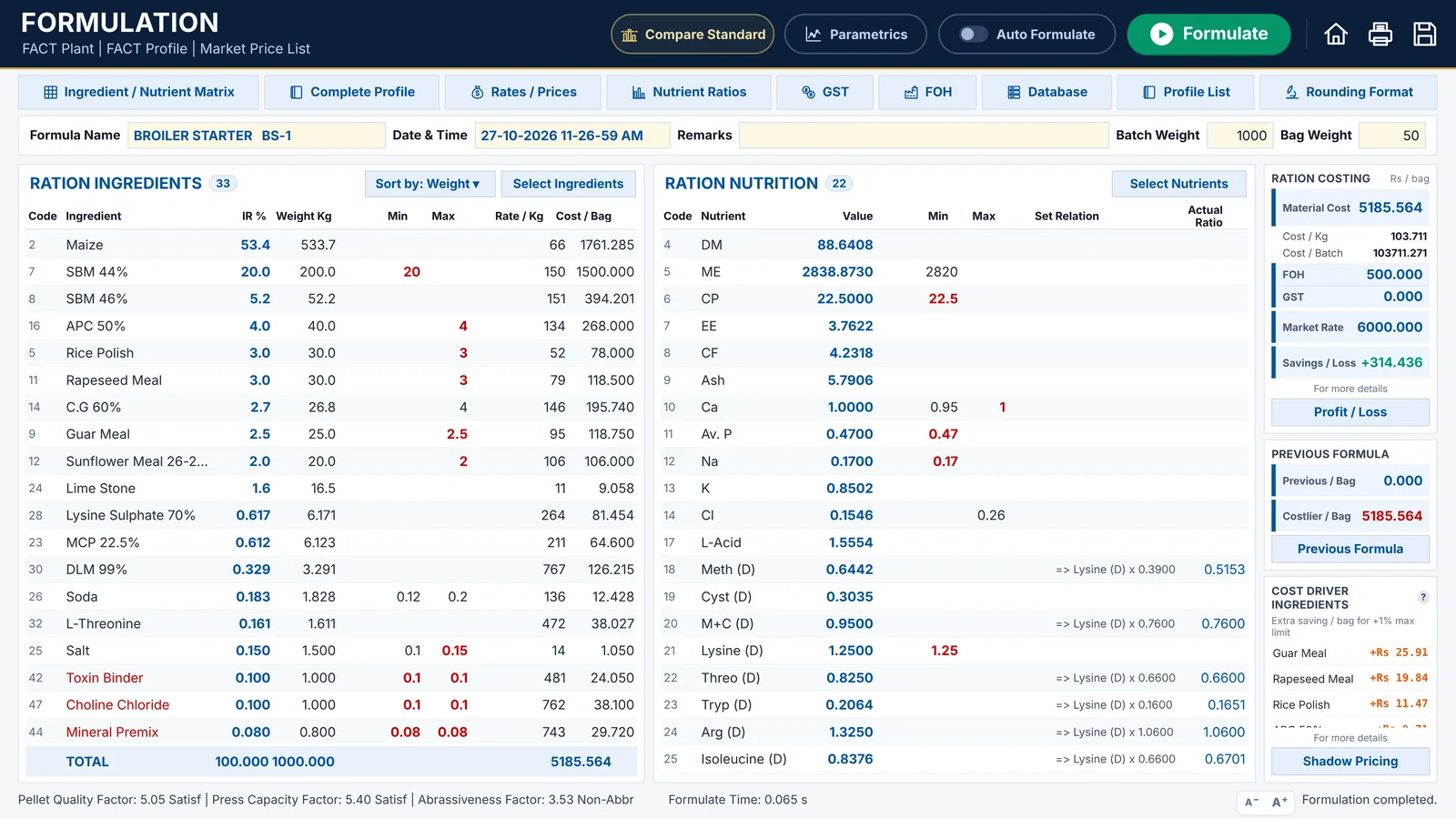
The least-cost formula, in a click in FACT, with demo data

FACT AI

Answers from your own figures, on your computer

FACT AI explains every Formulate in plain words: why each ingredient is in the formula and how much of it, the limits that hold the cost up, and what a shortage of an ingredient would cost. When the limits cannot all be met, SMART FIX finds the single change that makes the formula feasible. FACT AI Offline is free and works on your computer: everything is worked out from FACT’s own figures, and nothing is sent anywhere.

Why this formula?Why each ingredient is used, the limits that cost most, and what if one runs out.
Smart fixThe cheapest change that makes a formula feasible, applied in one click.
Data auditValues that look wrong, such as a decimal point in the wrong place.
Rate watchThe rates of the week and the rates to check.
Insights on HomeThe rations cheaper today, the rates of the week, and the ingredient decision for any ingredient at any rate.
Nutritionist’s noteThe formula as a note in English, Roman Urdu or Urdu, ready for WhatsApp.
FACT AI on the Formulation: why this formula costs what it does, with demo data

Ask FACT

Ask why, on every screen

A gold ASK FACT tab sits on every screen. Ask how to do something in English or Roman Urdu, and get the steps, the screen to open and the video to watch. On the Formulation, ask why FACT uses so much of an ingredient: FACT AI shows the limits that need it, its share of their nutrients and its price range, and tries a maximum at once, so you see what each cap would cost before you change anything.

In your wordsEnglish or Roman Urdu: “rate kaise change karen?”
Why so much?The limits behind an ingredient, from the Solver report of the last Formulate.
A maximum triedEach cap formulated on a copy, with its cost per bag.
Steps and videosThe answer, the screen to open and the tutorial to watch.
Ask FACT on the Formulation: why the formula uses this much DLM, with demo data

Read with FACT AI

Rates, stock and formulas from a message, a picture or a PDF

Paste a rate message from WhatsApp into a price list, or read your rates, your stock list or a formula sheet from a picture or a PDF. FACT AI reads the names in English, Roman Urdu or Urdu and the units in kg, mann, bags or tons, and puts each figure on the right ingredient: a plain “SBM” goes to the SBM your rations use. Names it is not sure of, two lines of one ingredient and the lines of nutrients are shown to you before anything is saved.

Paste ratesA broker’s rate message, or its picture or PDF, into your price list, checked before saving.
Read stockStock Projection from a list, a picture or a PDF.
Read a formulaThe IR % or weights of a sheet, analysed in the Formula Analysis.
On your computerPictures are read by the computer’s own text recognition: nothing is sent.
Read a Formula in FACT: a formula sheet read into the Formula Analysis, with demo data

Not feasible

When the limits cannot all be met

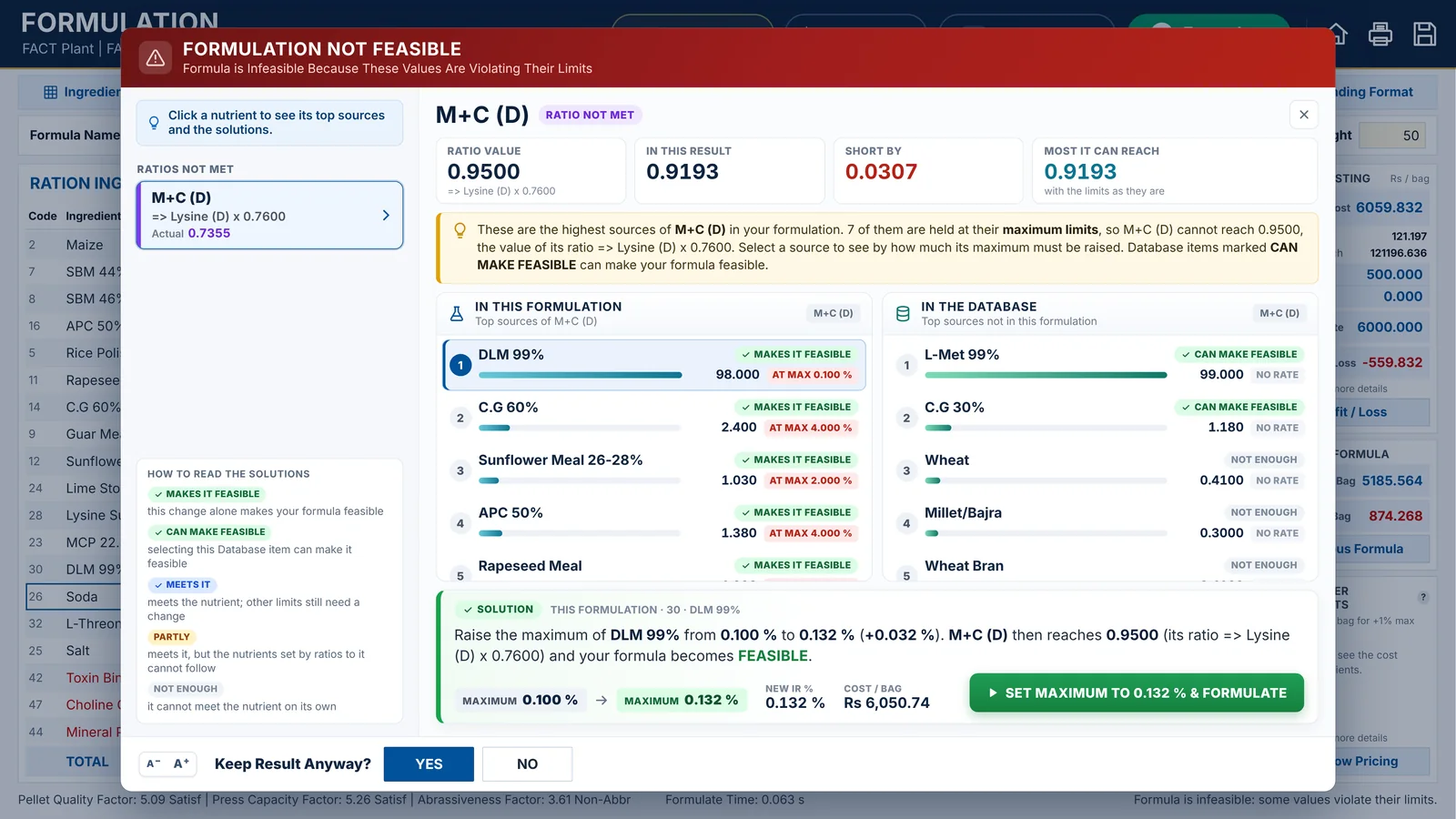
FACT lists the values that break their limits and shows the best sources of each, in your formula and in your database. It works out the change that makes the formula feasible, with its cost, and applies it in one click.

Short byHow far a nutrient is from its limit, and the most it can reach.
Makes it feasibleThe single changes that solve the formula, ranked for you.
Database ideasIngredients you do not use yet that could help.
Keep or clearKeep the closest result, or clear it and change your limits.
When the limits cannot all be met in FACT, with demo data

Shadow pricing

Know what each limit costs you

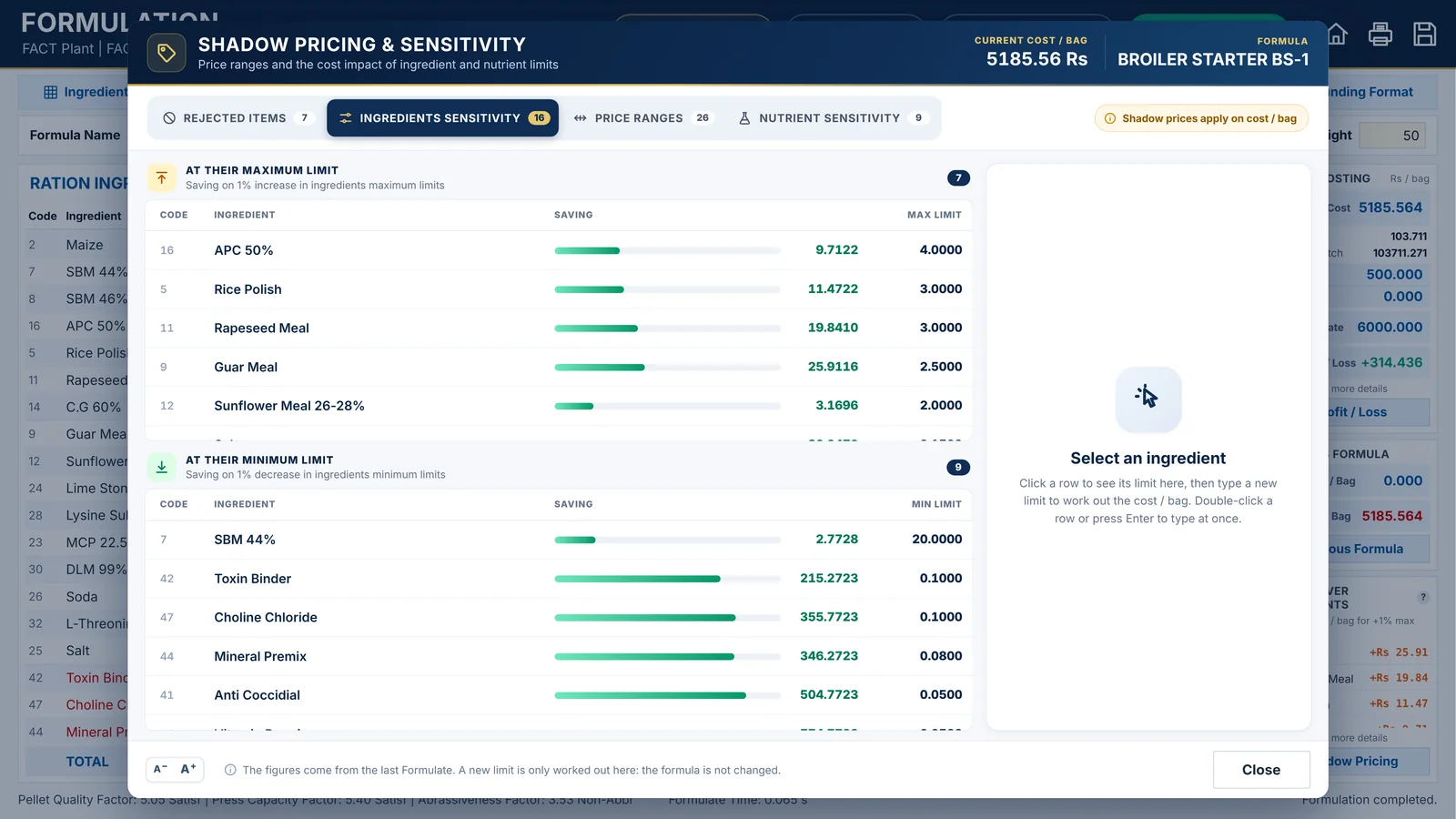
Shadow pricing shows the saving of one percent more of each ingredient held at its maximum, the price at which a rejected ingredient would come in, and the price range in which your formula stays the same. Try a new limit and see the new cost per bag before you change anything.

Rejected itemsThe price that brings an unused ingredient into the formula.
Ingredient sensitivityThe saving of each 1% of a maximum or minimum limit.
Price rangesHow far a price can move before the formula changes.
Nutrient sensitivityThe cost of every nutrient limit the formula reaches.
Know what each limit costs you in FACT, with demo data

Costing

Costing, savings and GST for every bag

Every formula shows its full costing: factory overheads, admin and selling costs, material cost, total cost and the net margin at your market rate. Change the overheads and the market rate of the formula model right on the Formulation with FOH. The GST calculation works out the input and output GST and the saving after GST.

Profit and lossThe full costing of one bag, in one window.
Price list comparisonWhat the same formula would save with your other price lists.
GST calculationFreight, discounts and output GST, worked out for you.
PelletabilityPellet quality, press capacity and abrasiveness of the formula.
Costing, savings and GST for every bag in FACT, with demo data

Parametrics

Ask “what if?” before you decide

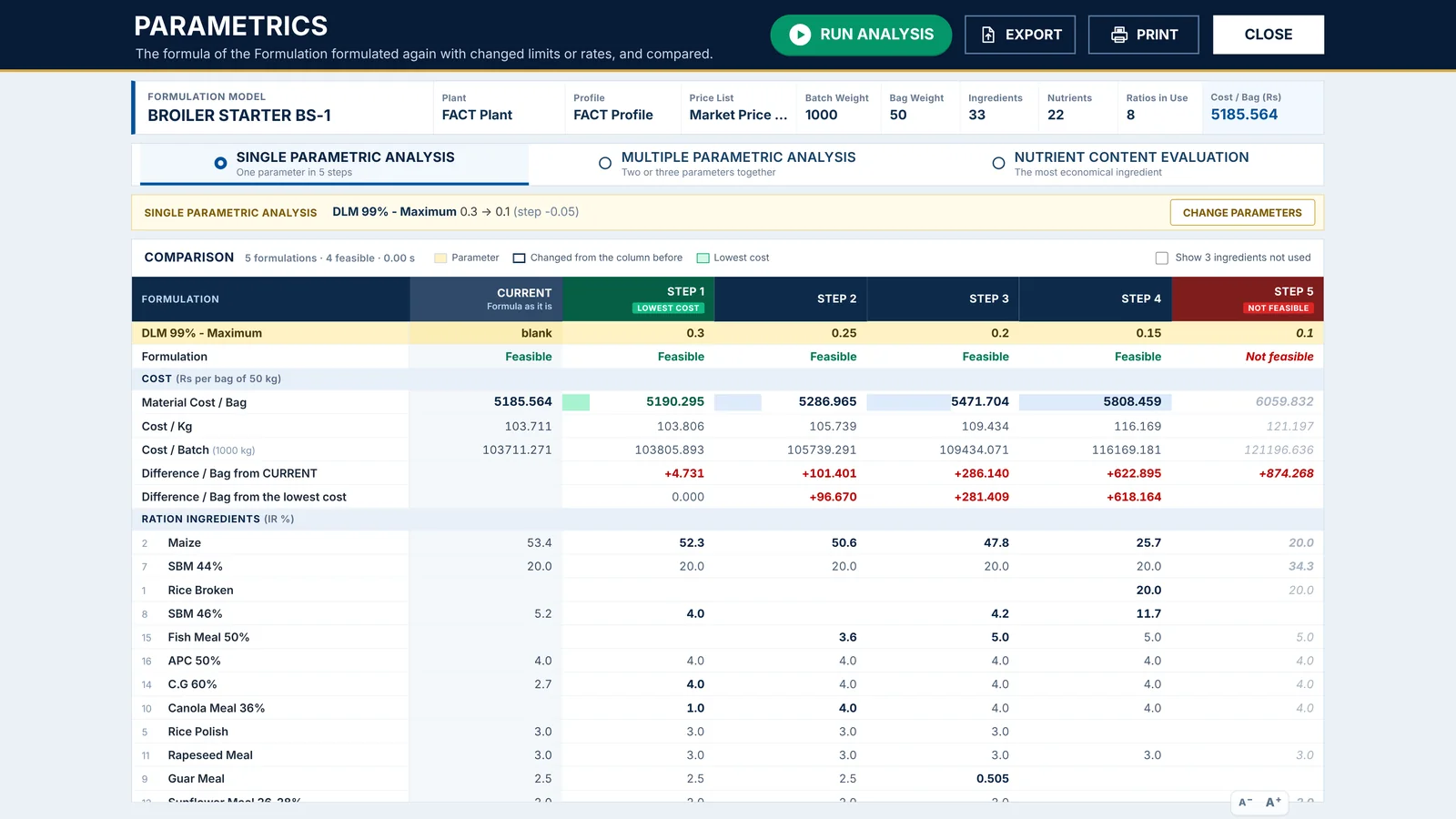
Run one limit, nutrient or price through five steps, change two or three parameters together, or find the most economical of 2 to 5 similar ingredients, such as SBM 44% and SBM 46%. The formula on your screen does not change.

Single analysisOne parameter in five steps, with the cost of each.
Multiple analysisTwo or three parameters changed together.
Content evaluationWhich of several similar ingredients is the best buy.
PrintThe whole comparison on paper, with nutrients.
Ask “what if?” before you decide in FACT, with demo data

Multiblend

Every feed of your plant on one screen

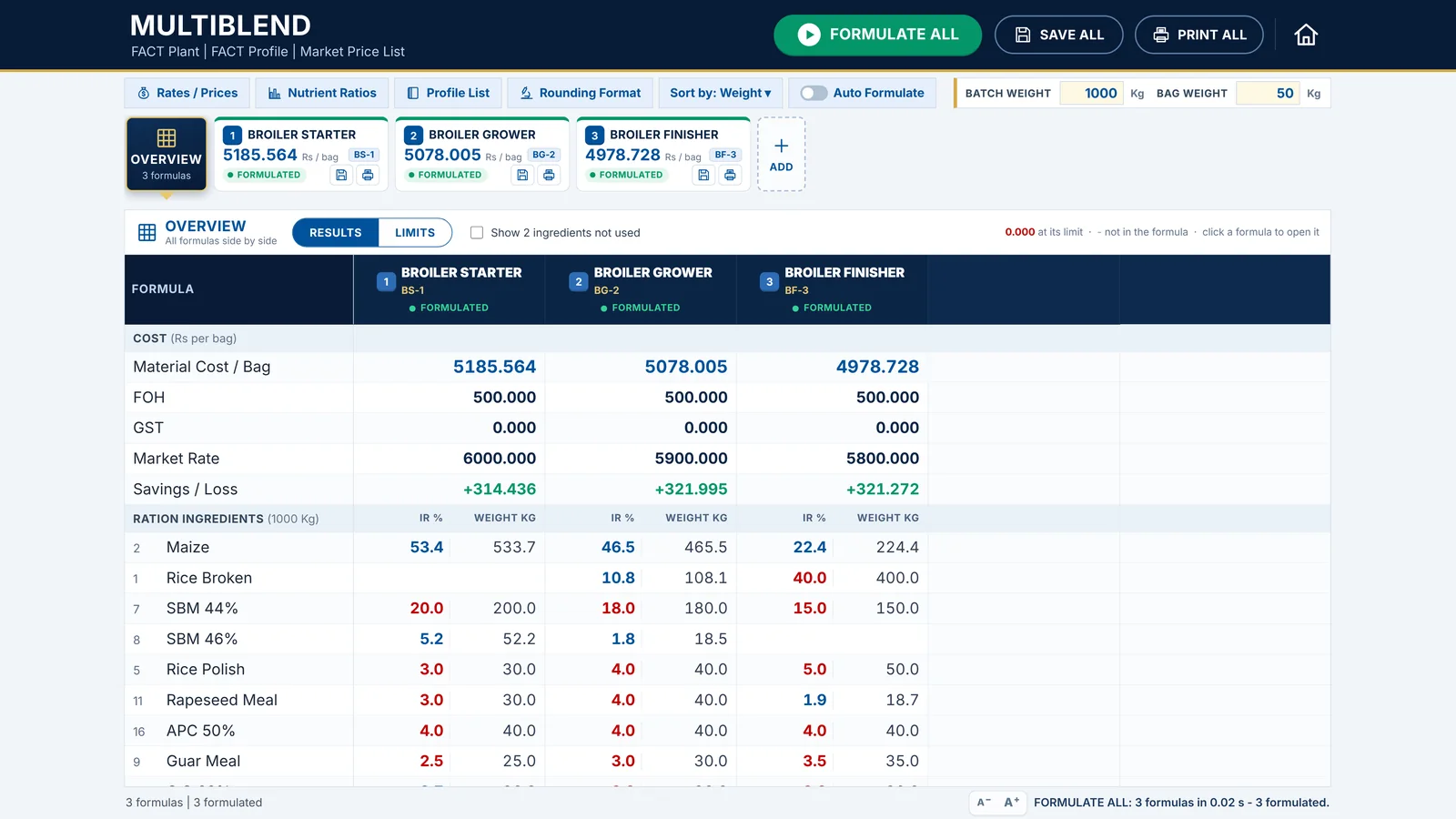
Open the starter, grower and finisher together. Formulate all of them, compare results and limits side by side, set the same limit in every formula in one step, then save and print them together.

Formulate allEvery formula solved in one click.
OverviewCosts, ingredients and nutrients of all formulas side by side.
Save allSave every formula in the Feed Store, as current rations if you like.
Print allProduction, costing or nutrition prints for every feed.
Every feed of your plant on one screen in FACT, with demo data

Formula analysis

Check a ration you write yourself

Type the inclusion rates or weights of a hand-made ration, or one from a consultant. FACT works out the nutrients, the cost, the saving and the pellet quality factors as you type.

Inclusion or weightType percentages or kilograms per batch.
TotalsThe total turns green at exactly 100%.
Fixed valuesPremixes you always add start filled in.
Analysis storeSave analyses and open them again later.
Check a ration you write yourself in FACT, with demo data

Feed store and comparison

Every saved formula, and three side by side

Every formula you save goes to the Feed Store with its comments and date, as a FACT formula file: no Excel is needed, and your Excel formulas are converted once. Compare up to three saved rations side by side, at the prices you use today, and try a change before you decide.

Search and filterFind a ration by name, comments, date or model.
Current rationsThe ration each feed uses now, for stock planning.
Side by sideMaterial cost, margin, nutrients and ingredients of three rations.
Try a changeChange an inclusion rate or a price and see the effect.
Every saved formula, and three side by side in FACT, with demo data

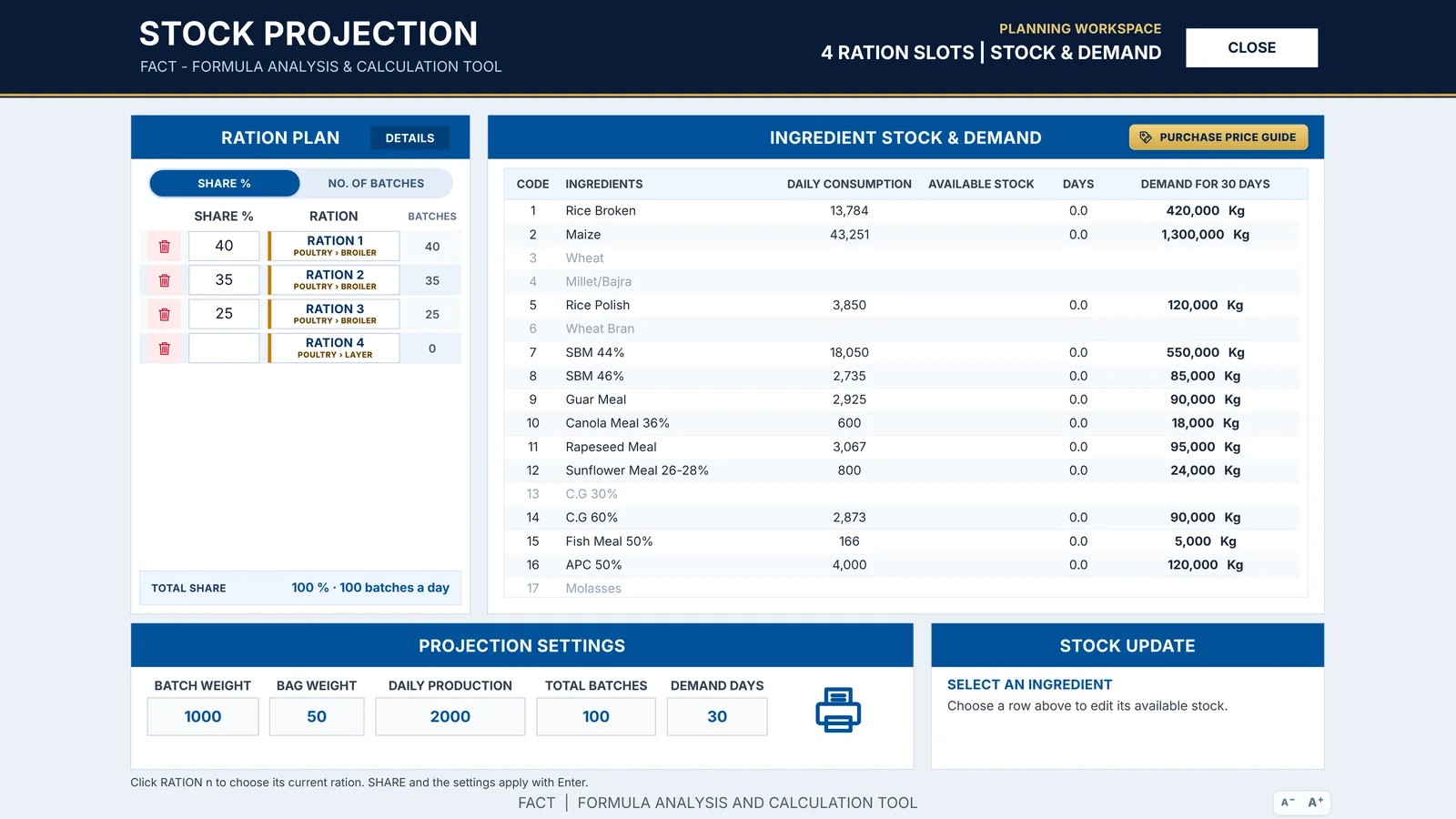
Stock projection

How long your stock lasts, and what to buy

Enter your daily production and the share of each feed, or the batches a day of each feed. FACT works out the daily use of every ingredient from your current rations, how many days your stock lasts and what to buy for the days ahead.

Daily consumptionKilograms of every ingredient you use each day.
Consumption for any daysThe use of every ingredient for the days you choose.
Days of stockHow long each ingredient lasts.
DemandWhat to buy for the days you plan for.
Read stockYour stock from a list, a picture or a PDF, with FACT AI.
PrintA purchase list, by category if you like.
How long your stock lasts, and what to buy in FACT, with demo data

Rates trend

Every price change kept, with its trend

From the day you start, FACT keeps every change of a price with its date: in your price lists, in the market rates of your feeds and in the values of your Database. The RECORD of an ingredient shows its price now, the lowest and the highest, the average and the change, with a chart of every change, or week by week, month by month and year by year. The record of a whole price list puts its months side by side.

Every change keptEach price with the day it changed, from the day you start.
Weekly, monthly, yearlyOpening, lowest, highest and closing price of each period, with a chart.
Lowest, highest, averageHow far a price moved, and when.
With or without GSTThe prices as your list keeps them, or the rates without GST.
Feeds and values tooThe market rates of your formula models and your Database values have a record.
Print and exportOne ingredient, or the whole list with its months side by side.
The RATE RECORD of maize in FACT: its monthly trend, with demo data

Purchase price guide

Your ingredient purchase plan: the right price to buy

Give each ration of your Stock Projection its share of the production, or its batches a day, and open the Purchase Price Guide. FACT formulates the last saved formula of each ration at today’s prices and finds, for every ingredient, how much of it the whole plan uses at every price of its own. Your buyer reads three prices for each ingredient: the LOW RANGE, below which the plan uses more of it; the HIGH RANGE, up to which it uses as much as today; and the END RATE, above which no ration uses it. An ingredient the formulas do not use shows the price at which it comes in.

All ingredientsPrice now, use a day and the three prices of each, by category or kind.
Comes in atThe price at which a rejected ingredient enters your formulas.
Needed at any priceWhen the limits cannot be met without an ingredient: the least they need, and why.
Your plan, your sharesEvery ration of the plan in one guide, by its share or its batches a day.
The buyers’ printTick the ingredients to print, or export them as PDF, Excel or CSV.
Nothing changesYour formulas stay as they are: the guide only works them out.
The Purchase Price Guide of FACT: the price ranges of every ingredient of the plan, with demo data

One ingredient

See its use at every price, ration by ration

Open one ingredient of the guide: a chart shows how much the plan uses at every price, step by step, with today’s price, the LOW RANGE, the HIGH RANGE and the END RATE on it. Type a price and see the use at once. Each ration shows its own share of the ingredient and its own prices. Remove a forced minimum, or change a maximum, and FACT works out the plan again: the new use of the ingredient, the formula changes and the cost of the plan a day, before you change anything.

Use at every priceA chart and the price steps, with today’s step marked.
Try a priceThe use a day at any price you type.
In each rationEvery ration’s inclusion, minimum, maximum and price range.
Min and MaxChange or remove a limit, and see the plan and its cost a day.
One ingredient in the Purchase Price Guide of FACT: its use at every price, with demo data

Prints

Professional prints in one clean design

Every print of FACT has the same modern look: the FACT logo, the formula and its date at the top, the key figures in tiles, clear tables with totals, and a line for the nutritionist’s signature. Figures follow your Rounding Format, and a long list fits its page by itself.

Production sheetIngredient weights for the batch, pellet factors and your remarks.
Costing and nutritionCost per bag, ration costing, nutrients and ratios on one page.
ComparisonsThree rations, your price lists or the steps of a parametric analysis side by side.
19 printsFormulation, analysis, database, prices, models, stock and more.
FACT prints: Ration Comparison, Nutrition Sheet and Production Sheet, with demo data

Export

Every print as PDF, Excel or CSV

Next to every Print there is Export, with the same options. PDF saves the print exactly as it looks on paper. Excel gives a workbook with the same sections and totals and real numbers you can calculate with. CSV opens in any program. The files go to the EXPORTS folder of FACT, in a folder for each plant, screen and print, and open with one click.

PDFThe print as a document, page by page, ready to send.
ExcelTables, totals and the print’s colours, with numbers you can sum.
CSVPlain rows for any program or your own reports.
Same optionsThe print’s own choices: categories, batch weight and more.
The Export window of FACT: PDF, Excel or CSV, with demo data

Breed standards

Compare every formula with a breed standard

Keep the breed standards of each formula model, with the nutrient levels of their manuals (one value, or a minimum to maximum range), for any breed and any phase. On the Formulation, Compare with Standard puts the formula next to a standard: the standard, the formula, the difference and the formula as a percentage of the standard, with a match score and the largest gaps first.

Any number of standardsSeveral breeds and phases for each formula model.
Match scoreThe nutrients within your tolerance of 1, 2, 3 or 5%.
ImportTake a standard of another model, or of another plant.
Print and exportThe comparison on paper, or as PDF, Excel or CSV.
Compare with Standard in FACT: a formula next to a breed standard, with demo data

Premix

A premix of any category, ready to weigh

Choose a category of the formula, such as the micro ingredients, with the bag of each ingredient, your premix mixer and a carrier. FACT works out the premix of each feed batch as a round figure, how many feed batches one premix batch is for, and the full bags and loose kilograms of every ingredient, ready for the mixing floor.

Round figuresThe premix of a feed batch rounded up; the carrier makes up the rest.
Your mixerAs many feed batches as the premix mixer holds, or fewer.
Bags and looseThe full bags of each ingredient and the loose kilograms to weigh.
Premix SheetThe lines in your own order; print it, or export it as PDF, Excel or CSV.
Make a Premix in FACT: the micro ingredients of a formula as one premix, with demo data

Set up once

Your data, organised the way you work

The Home screen groups your data into UPDATE and SELECT, just like the FACT workbook you may know.

Database

Ingredients with their nutrient values and your own categories, in the order of your prints, nutrient equations, and pelletability factors.

Video 5

Ingredient prices

Price lists with or without GST, the date of every change, and price list comparison.

Video 6

Formula models

One model per feed, with its selling rate, factory overheads, admin costs and bag weight.

Video 7

Nutrient ratios

Ratios such as digestible methionine to lysine, applied at every Formulate.

Video 8

Plants

One FACT for all your feed plants, each with its own models, prices, stock, saved rations and currency.

Video 9

Profiles

More than one set of nutrient values, for example for a new crop or another supplier.

Video 9

Selections

Choose the ingredients and nutrients of each model, with defaults for new models.

Video 10

Printing and export

Production sheets for the mixing floor, costing and nutrition prints, price lists and plans, in one clean design. Every print also exports to PDF, Excel or CSV.

Video 23

Import your Excel data

With a key that allows it, FACT reads your FACT .xlsm file once: database, prices, models, ratios and current rations.

Video 1

Ready for your next formula?

Try FACT free for 10 days on Windows, Mac or Android: no License Key needed. Then send us your Machine Code on WhatsApp for your License Key.

WhatsApp