
Feed formulation software for Windows, Mac and Android
The least-cost formula, in under a second.
FACT finds the cheapest mix that meets every ingredient and nutrient limit. Then it shows you what drives the cost, so you can decide with confidence.
Used by 70+ feed professionalsWorks offline10-day free trial, no key needed
Free trial
Try FACT free for 10 days
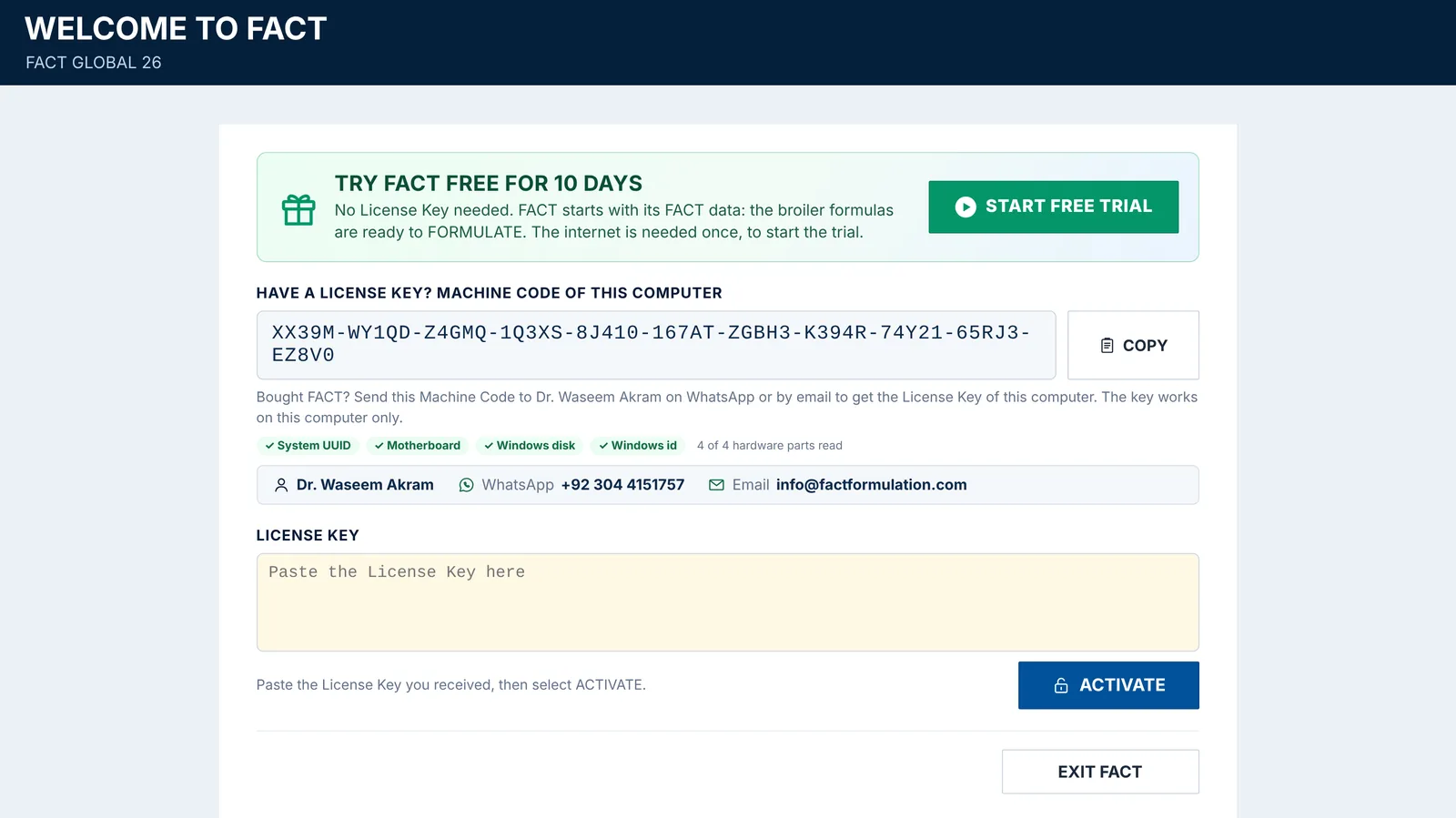
On Windows, Mac and Android: download FACT, open it and select START FREE TRIAL. No License Key needed.
- Ready to formulate: FACT’s own data with Broiler Starter, Grower and Finisher, their ingredient and nutrient limits and ratios. Select FORMULATE and see the least-cost formula.
- Breed standards: Ross 308 and Cobb 500 starter, to compare your formula with.
- Already a FACT user? Import the data of your FACT file (.xlsm), or connect FACT for Android to FACT on your Windows computer or Mac.
- After 10 days a License Key keeps FACT open: your data stays.
Once on each computer, phone or tablet. FACT for iPhone comes in the App Store.
Everything in one app
From the ingredient database to the purchase plan
FACT covers the whole formulation job: your data, the least-cost formula, the reasons behind its cost, and the plan for your raw materials.
Least-cost formulation
Set ingredient and nutrient limits and ratios. FACT finds the cheapest formula that meets them all.
Fix what is not feasible
When limits cannot all be met, FACT names the problem and offers the changes that solve it.
Shadow pricing
See which limits drive the cost, what 1% more would save, and when a rejected ingredient comes in.
Parametrics
Run a limit, a nutrient or a price through five steps and compare the formulas side by side.
Multiblend
Formulate all the feeds of a plant on one screen, then save and print them together.
Costing and GST
Material cost, overheads, margin and GST for every bag, with savings against your market rate.
Ingredient database
Nutrient values in profiles you can copy and switch, plus pelletability factors.
Price lists
Keep several price lists, with or without GST, and compare what each does to your cost.
Formula analysis
Check a ration you or a consultant wrote: nutrients, cost and pellet quality at once.
Feed store
Every saved formula and analysis in one place, ready to open, print or compare.
Formula comparison
Up to three saved rations side by side, at today’s prices.
Stock projection
Daily use of every ingredient, days of stock left, and what to buy.
A look inside
Real screens, real answers
These are FACT’s own screens, shown with demo data.
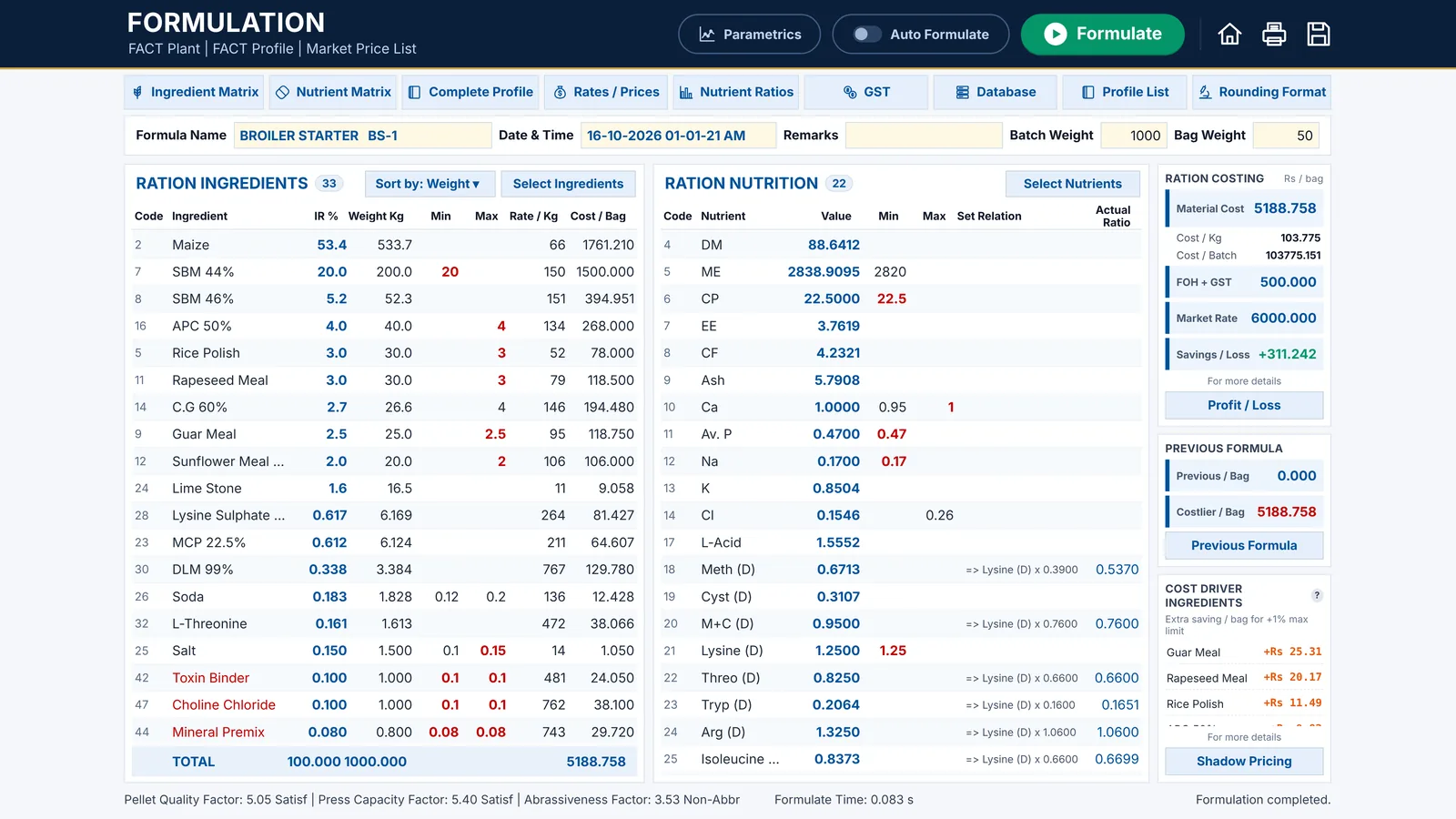
The Formulation screen
Ingredient limits on the left, nutrient limits in the middle, costing on the right. One click on Formulate gives the least-cost formula.
- Limits the formula reaches turn red, so you see what decides the cost
- Material cost, overheads, market rate and saving for each bag
- Every result is compared with the previous formula
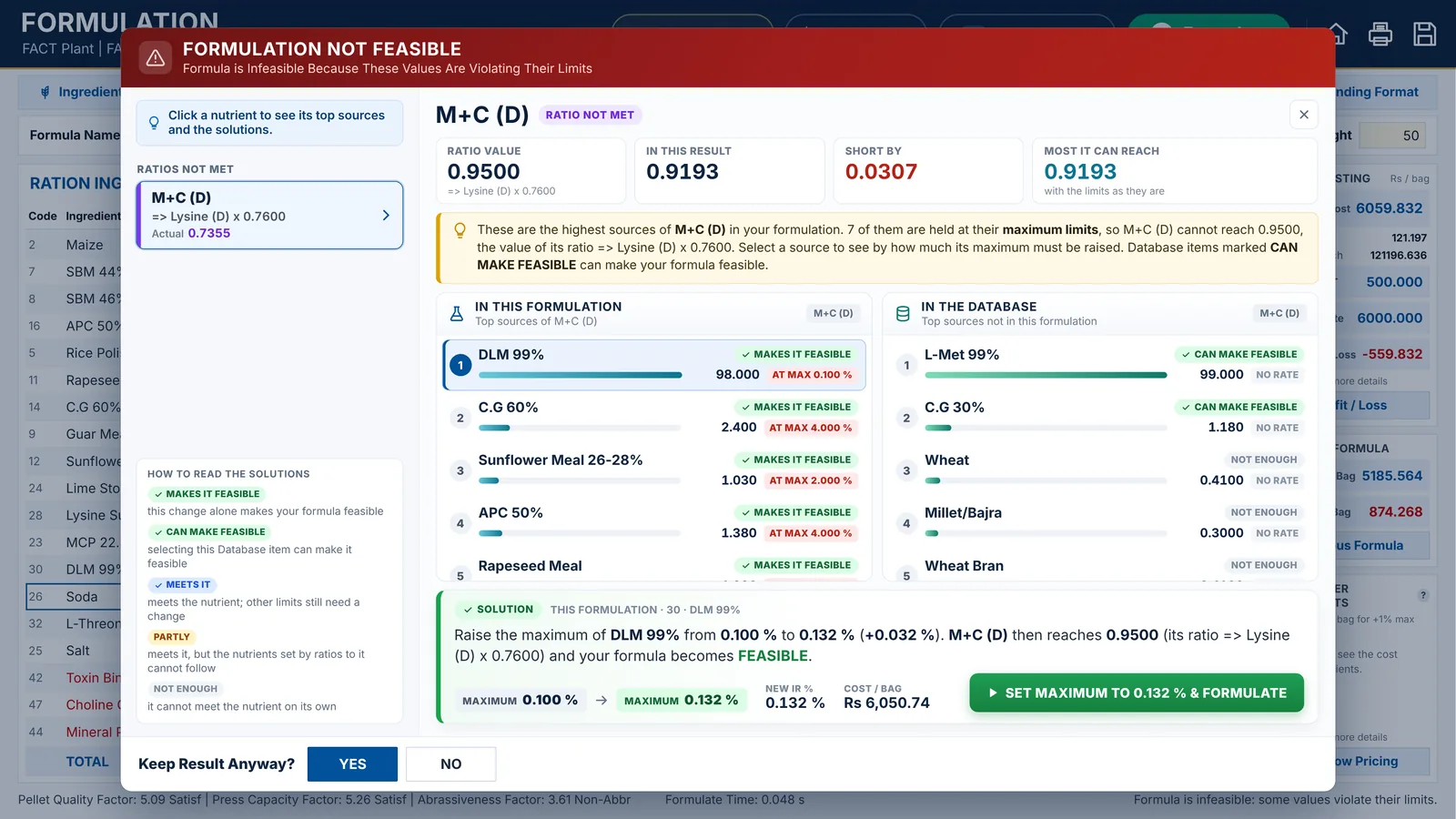
When the limits cannot all be met
FACT lists the values that break their limits, shows their best sources in your formula and your database, and works out the change that fixes it.
- How much a nutrient is short, and the most it can reach
- Each fix with its new cost per bag
- One click sets the new limit and formulates again
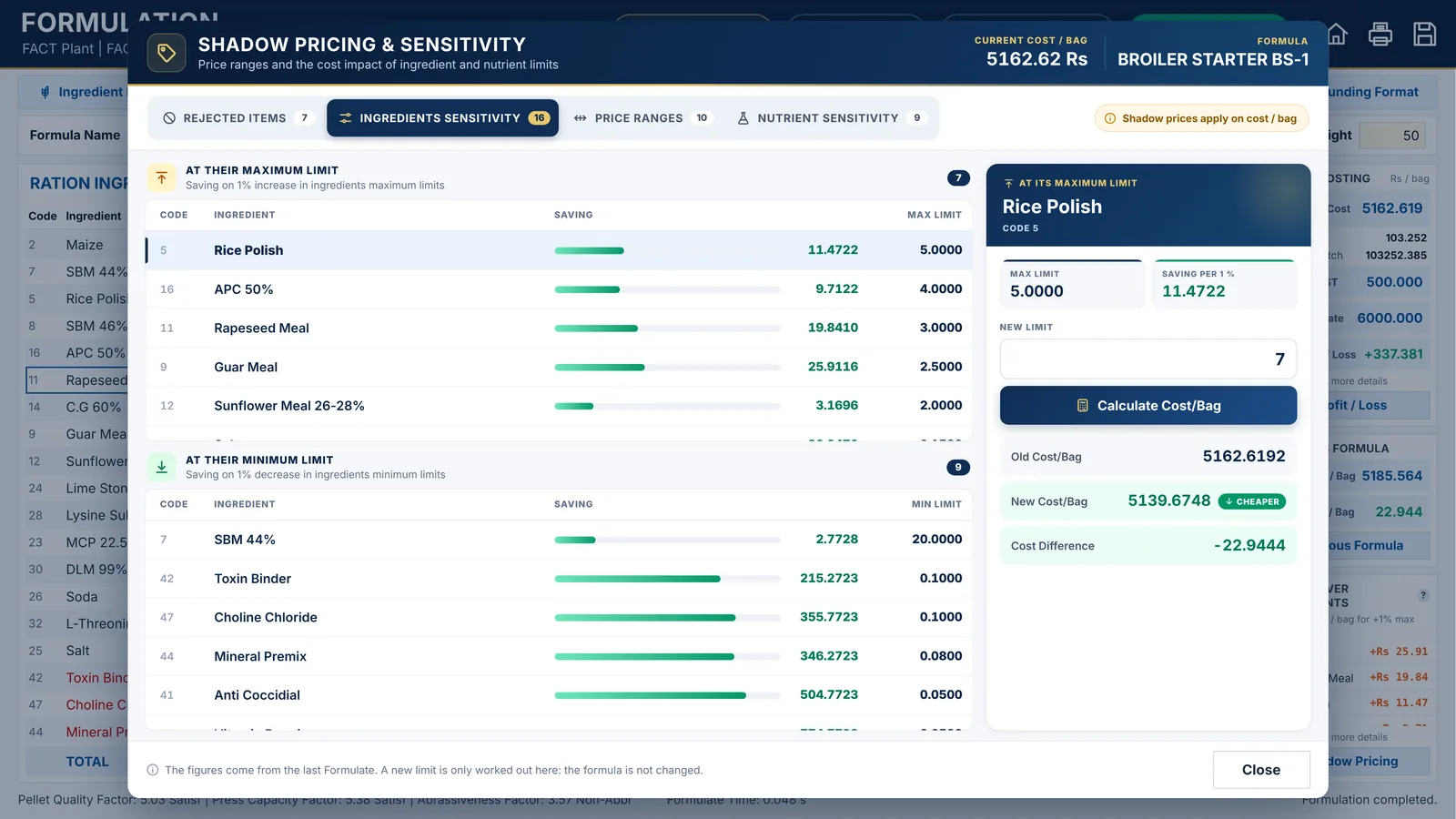
Shadow pricing and sensitivity
Know what each limit costs before you change it.
- The saving of 1% more for every ingredient at its maximum
- The price at which a rejected ingredient would come in
- The new cost per bag of any new limit you try
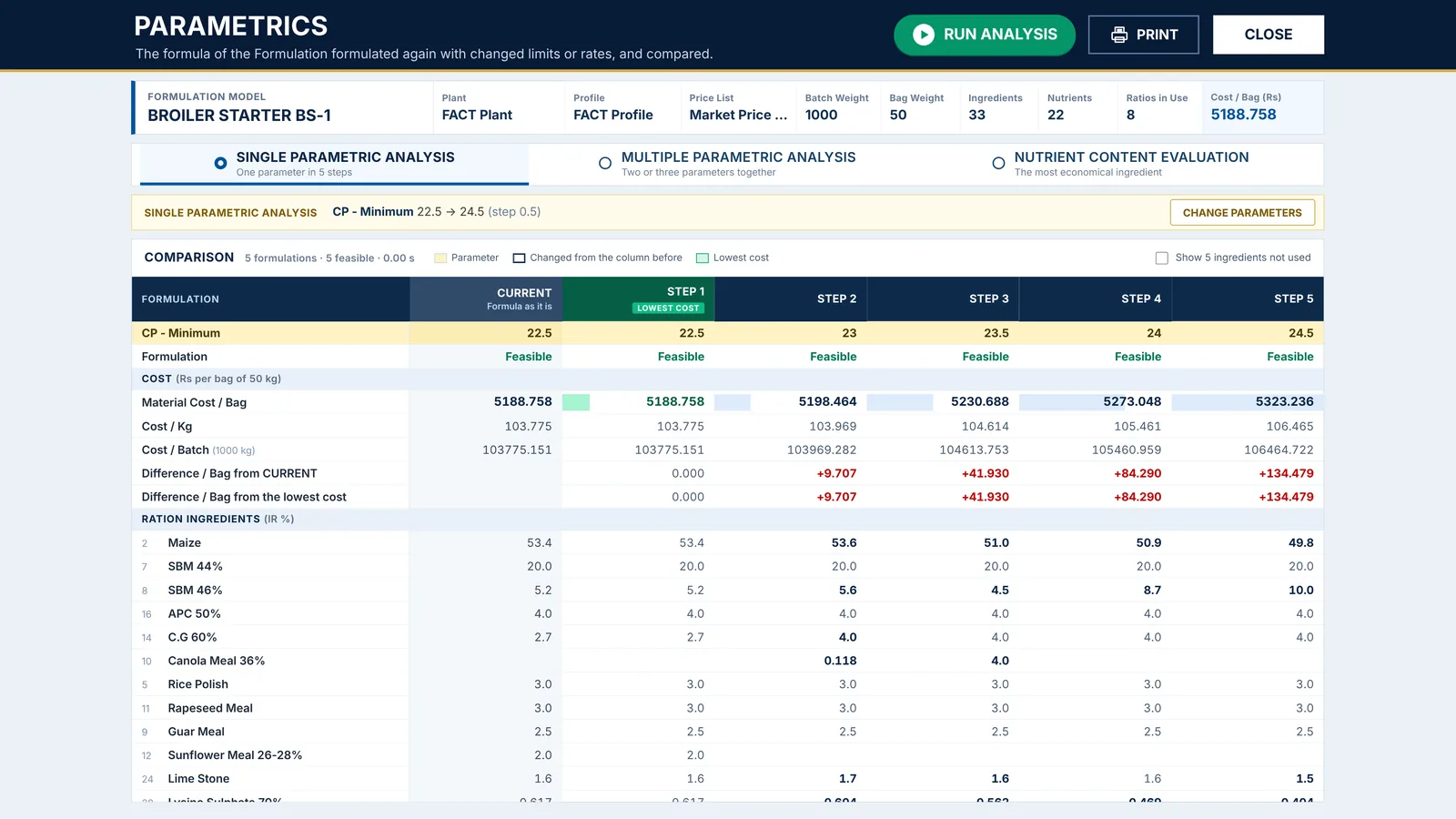
What if a limit or a price changes?
FACT formulates again and again with changed limits or prices, and shows what each change costs.
- One parameter in five steps, or two and three together
- The most economical of 2 to 5 similar ingredients
- Your formula on screen does not change
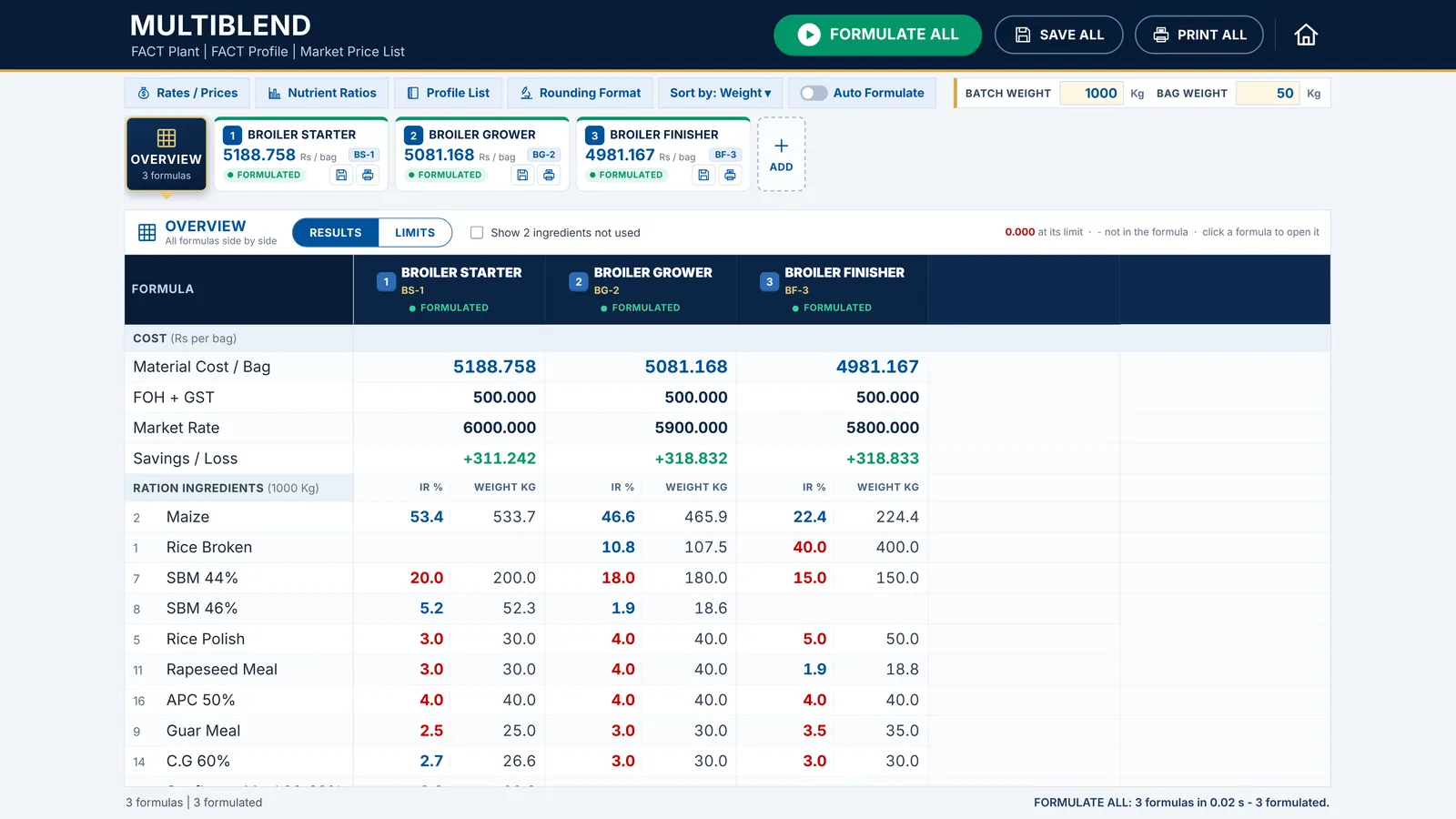
All your feeds on one screen
Open the starter, grower and finisher together, formulate them all, and compare the results side by side.
- Formulate all, save all and print all
- The same limit in every formula in one step
- Each formula keeps its own tools and solutions
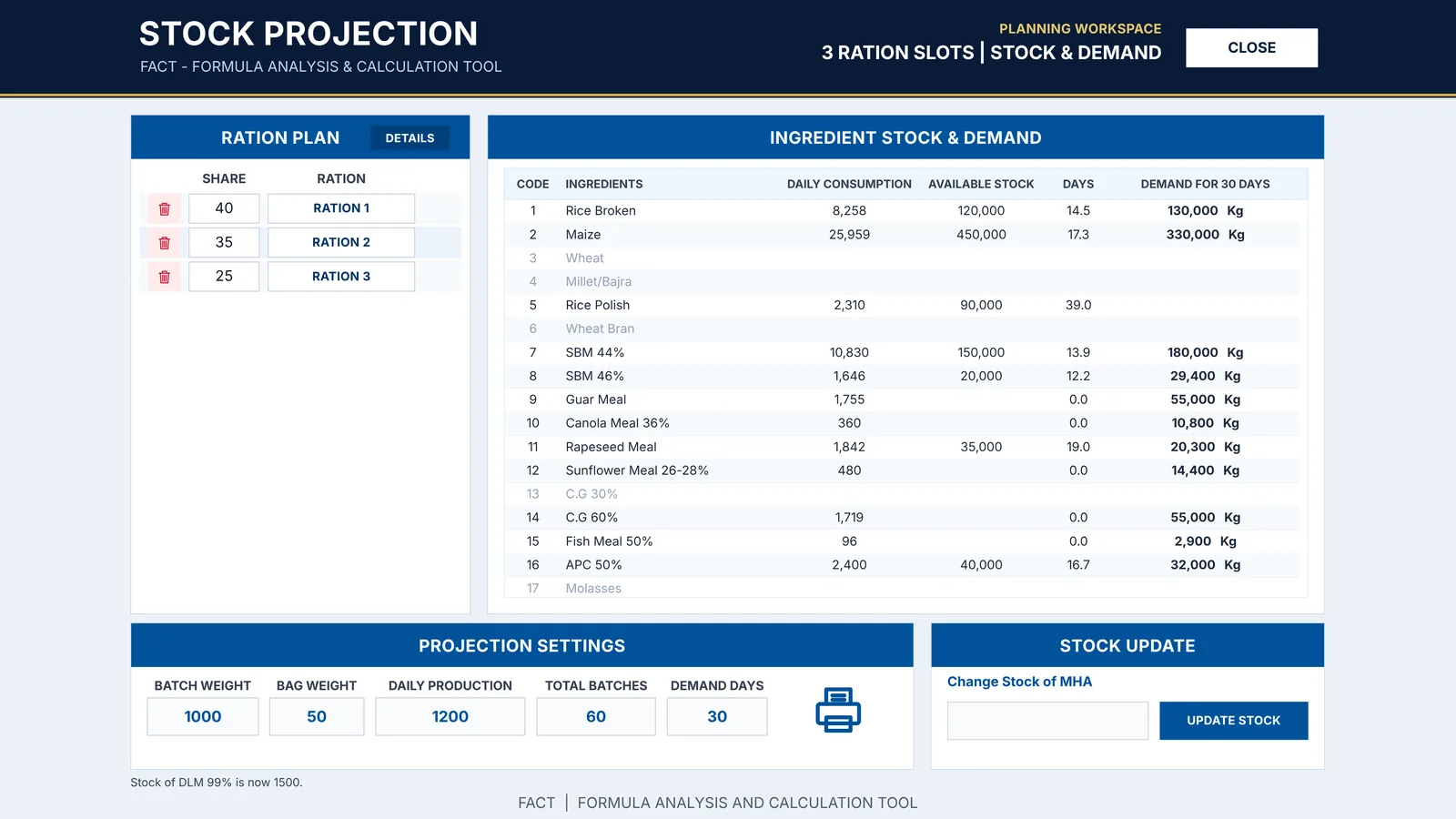
How long your stock lasts
From your current rations, daily production and the share of each feed, FACT plans your raw materials.
- Daily consumption of every ingredient
- Days of stock left at today’s production
- What to buy for the days you plan for
How it works
Four steps to a formula you can trust
Set up your data
Ingredients, nutrient values and prices, or FACT’s ready data. Coming from the FACT Excel workbook? FACT imports it in one step, also in the free trial.
Define each feed
A formula model per feed, with ingredient and nutrient limits, ratios, selling rate and overheads.
Formulate
FACT gives the least-cost formula in under a second, with its costing and saving per bag.
Save, print and plan
Production sheets for the mixing floor, the feed store, comparisons and your stock plan.
Platforms
On your computer, your phone and your tablet
The same FACT, with the same screens and the same results, on every device, and the same price: Rs 5,000 a month or Rs 50,000 a year. On Windows, Mac and Android also Rs 400,000 once, for a lifetime.
Windows
- 10-day free trial, no key needed
- Windows 10 or 11
- Microsoft Excel not needed
- Can import your FACT Excel data
- Same data on your other FACTs (Wi-Fi Sync)
Rs 5,000/ monthor Rs 50,000 / yearor Rs 400,000 for a lifetime
LatestBuild 82Published
Start free 10-day trialDownload for WindowsMac
- 10-day free trial, no key needed
- macOS 11 or later
- Apple silicon and Intel Macs
- Same data on your other FACTs (Wi-Fi Sync)
Rs 5,000/ monthor Rs 50,000 / yearor Rs 400,000 for a lifetime
LatestBuild 82Published
Start free 10-day trialDownload for MacAndroid
- 10-day free trial, no key needed
- Android 8.0 or later, phones and tablets
- Wi-Fi Sync with your other FACTs
Rs 5,000/ monthor Rs 50,000 / yearor Rs 400,000 for a lifetime
LatestBuild 82Published
Start free 10-day trialDownload for AndroidiPhone
- Monthly or yearly subscription
- iPhone and iPad
- Every FACT screen, laid out for the phone
Rs 5,000/ monthor Rs 50,000 / year
Coming very soonCombo: a computer and an Android phone or tablet, bought together, Rs 7,000 a month or Rs 75,000 a year (bought separately: Rs 10,000 a month, Rs 100,000 a year).
See all pricesFACT for Android · iPhone coming very soon
Your formulas in your pocket
Formulate, run Multiblend, check your stock plan and print from your Android phone or tablet, on the same data as your computer. FACT for iPhone and iPad is coming very soon.
- The full FACT, not a light version
- Monthly or yearly, or a lifetime license on Android
- Wi-Fi Sync with your other FACTs
 Android
 Android
 iPhone · very soon
Your data
Your data stays with you
FACT runs on your own computer. Your formulas, prices and database never leave it unless you send them.
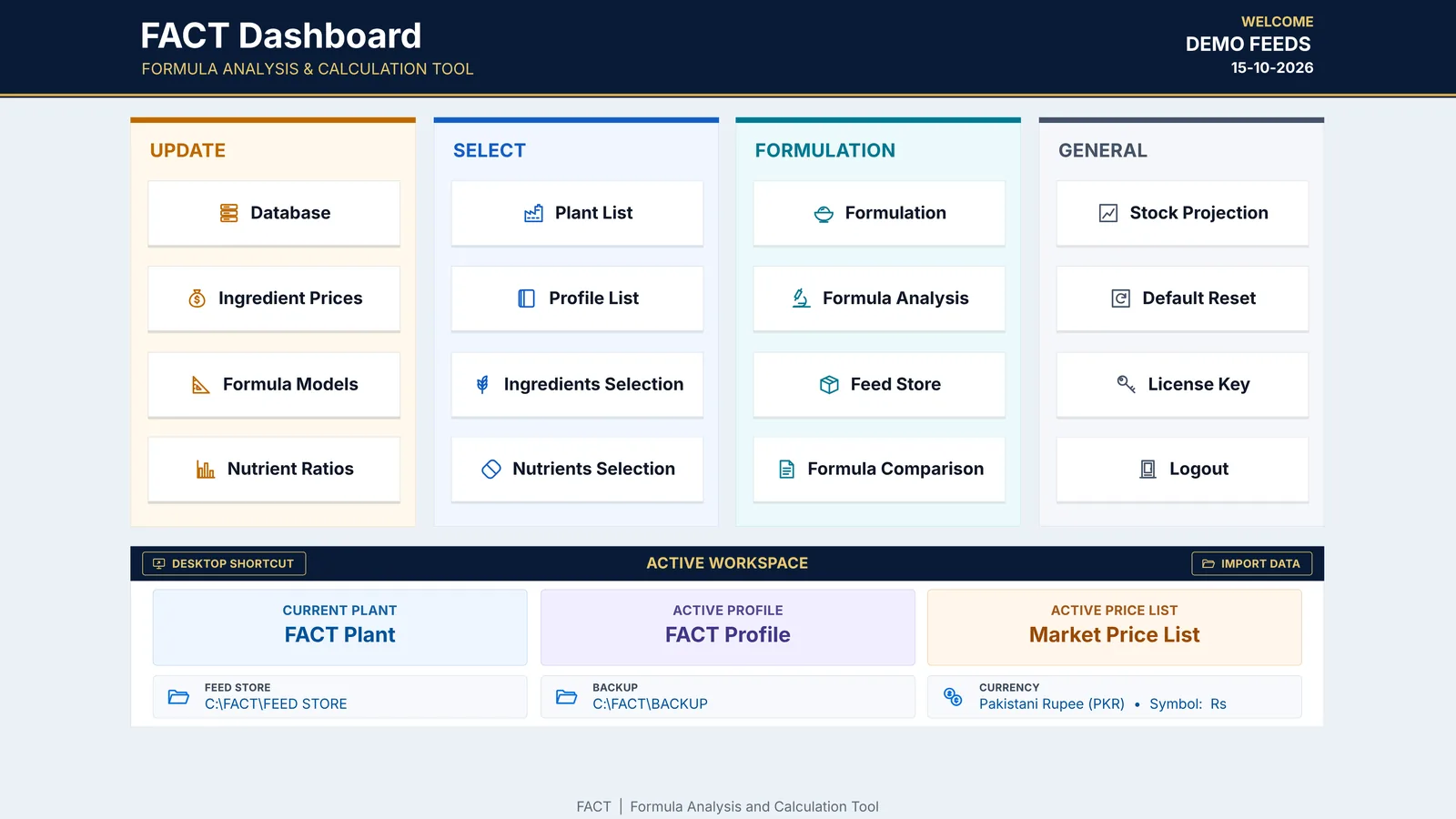
Learn FACT
23 tutorial videos, 53 minutes in all
From installation to stock projection, every feature is explained in simple English, one video per feature.

Made by a nutritionist
Dr. Waseem Akram
Animal Nutritionist with more than 12 years of experience in the poultry feed industry. FACT grew out of his own daily formulation work, and today more than 70 users formulate with it.
Questions
Good to know
Can I try FACT before I buy?
Yes: FACT is free for 10 days on Windows, Mac and Android, with no License Key. Download FACT, open it and select START FREE TRIAL. It starts with FACT’s own data, ready to formulate: Broiler Starter, Grower and Finisher with their ingredient and nutrient limits and ratios, and the Ross 308 and Cobb 500 starter standards. Already a FACT user? Import the data of your FACT file, or get all the data of your other FACT over Wi-Fi Sync. Starting the trial needs the internet once: FACT records its first day on factformulation.com, and after that it works offline. After 10 days FACT asks for a License Key, and your data stays. The free trial is once on each computer, phone or tablet, also when FACT is installed again.
How do I buy a license?
FACT is Rs 5,000 a month or Rs 50,000 a year on every platform (introductory prices, valid until 31 December 2026). On Windows, Mac and Android there is also a lifetime license: Rs 400,000, paid once. A computer with an Android phone or tablet, bought together, is Rs 7,000 a month or Rs 75,000 a year. Pay by bank transfer and send us the receipt and your Machine Code on WhatsApp: we send the License Key for one month, one year or a lifetime. All prices, and the price list in your currency: Pricing.
What happens when my month or year ends?
FACT asks for a new License Key. Pay for the next month or year and paste the new key: your data, formulas and settings stay as they are.
Does FACT need the internet?
No. FACT works offline. Only starting the 10-day free trial needs the internet, once. You need WhatsApp or email to get your License Key.
I use the FACT Excel workbook. Can I keep my data?
Yes. In the free trial, or with a License Key that allows Import Data, FACT reads your FACT .xlsm file once: ingredients, nutrient values, price lists, models, ratios, selections, current rations and stock projection. Your saved rations in FEED STORE open as they are, and Microsoft Excel is not needed after that.
Which computers and phones does FACT run on?
Windows 10 and 11, and Macs with macOS 11 or later (Apple silicon or Intel). FACT for Android runs on phones and tablets with Android 8.0 or later. FACT for iPhone is coming very soon. The price is the same on all of them.
Can I move FACT to a new computer?
A License Key works on one computer. For a new computer, send us its Machine Code on WhatsApp.
Where is my data kept?
On your own computer, in your FACT folder. On Windows your data is next to FACT.exe (in the folder of your FACT.xlsm), with FEED STORE and BACKUP one level up. On a Mac it is Documents › FACT. With Home › FACT FOLDER it can be a folder in iCloud Drive instead. Copy this folder from time to time to keep a backup. FACT for Android keeps your data on the phone or tablet, and Wi-Fi Sync keeps it the same on all your FACTs.
How does Wi-Fi Sync work?
Wi-Fi Sync keeps all your FACTs on the same data, FEED STORE and EXPORTS: on Windows, Mac and Android (and on the iPhone, coming very soon), any two of them, over your own Wi-Fi and without the internet. You connect two FACTs once with a 6-digit code: Home › WI-FI SYNC, where one FACT shows its code and the other types it (a phone or tablet shows its code, the computer types it). After that they sync whenever FACT is open on both, on the same Wi-Fi. Changed on both while apart? FACT puts the changes of both together and asks only about what both changed differently, with both versions side by side: you keep one side’s, thing by thing, and the other is kept in BACKUP. Both License Keys must be in the same name; in its free trial, FACT connects without a key and logs in with the other FACT’s user name and password.
How do I learn FACT?
Watch the 23 tutorial videos, from installation to stock projection. For anything else, message us on WhatsApp.
Ready for your next formula?
Try FACT free for 10 days on Windows, Mac or Android: no License Key needed. Then send us your Machine Code on WhatsApp for your License Key.